使用 HTML + JavaScript 实现红包雨游戏(附完整代码)
随着618、双十一等电商购物节的兴起,各种互动营销活动成为了吸引用户的重要手段。其中,"红包雨"作为一种趣味性强、参与度高的互动形式,深受用户喜爱。本文将介绍如何使用 HTML、CSS 和 JavaScript 实现一个完整的红包雨游戏,帮助开发者快速搭建类似电商平台的节日互动活动页面。
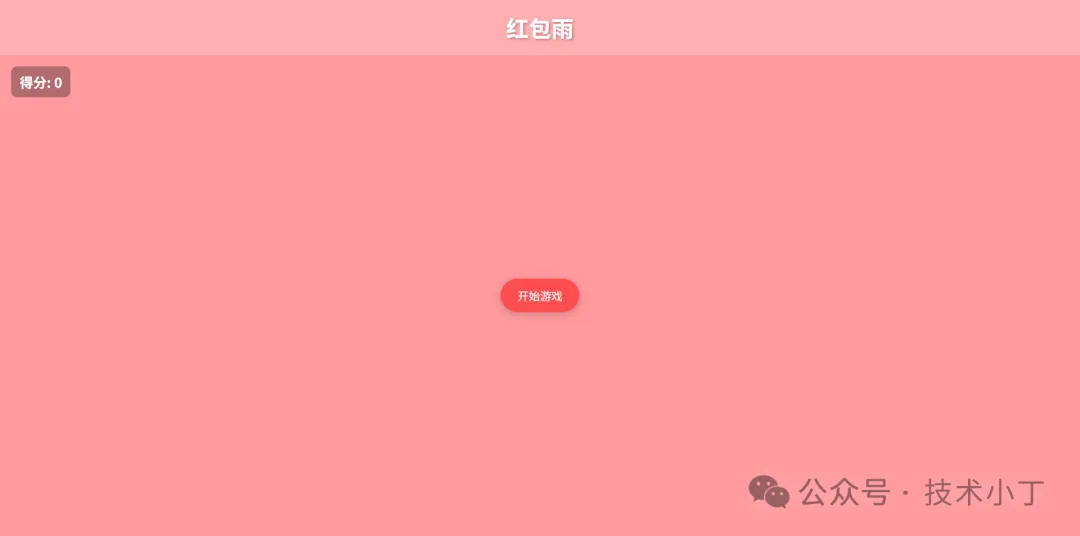
效果演示
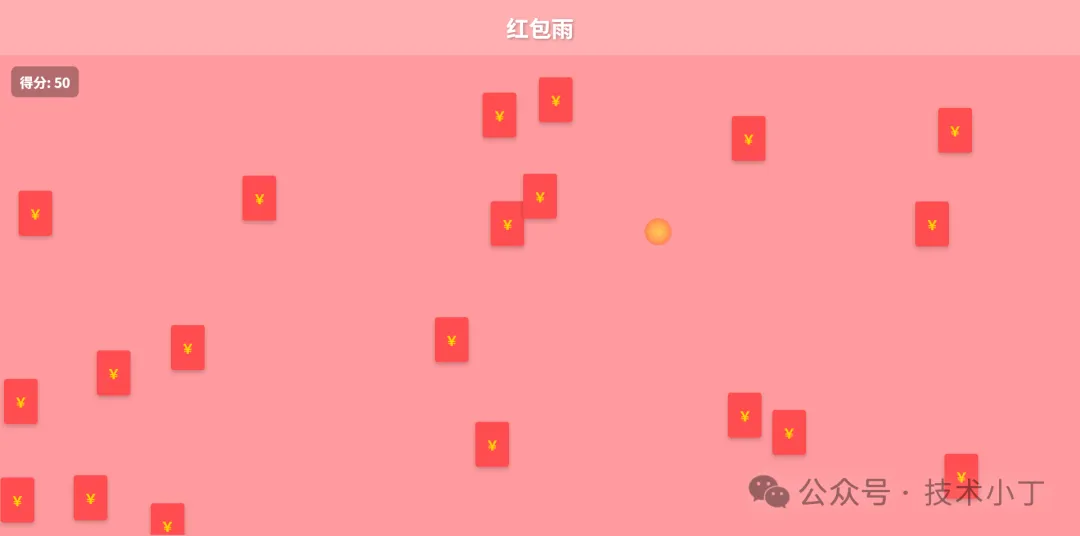
本系统模拟了典型的红包雨互动场景,玩家需要在限定时间内尽可能多地点击从天而降的红包来获得积分。游戏具有以下特点:
红包从屏幕顶部随机位置飘落
点击红包可获得积分,并伴有炫酷的爆炸动画效果
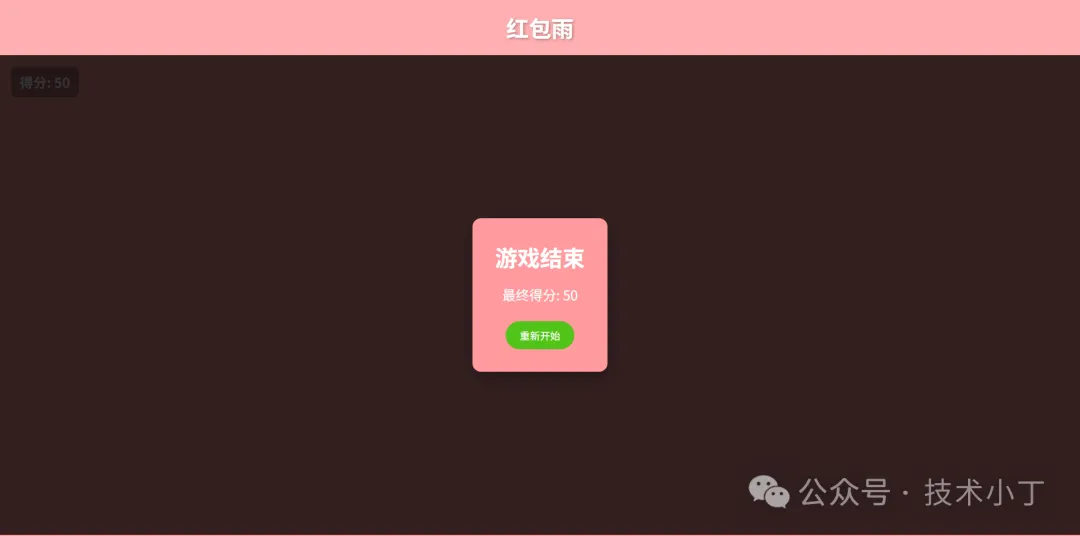
游戏结束后显示最终得分,并支持重新开始
页面结构
系统主要包括以下几个功能区域:
主体区域
主体区域是游戏的核心交互区域,包含了游戏的主要元素:
得分显示:实时显示当前获得的积分
开始按钮:触发游戏启动
遮罩层:游戏结束后显示结果和重新开始选项
<div class="main"> <div class="score">得分: <span id="score-value">0</span></div> <button id="start-btn" class="start-button" onclick="startGame()">开始游戏</button> <!-- 遮罩层 --> <div id="overlay" class="overlay hidden"> <div class="overlay-content"> <h2>游戏结束</h2> <p>最终得分: <span id="final-score">0</span></p> <button id="restart-btn" class="restart-button" onclick="startGame()">重新开始</button> </div> </div></div>红包元素
红包是游戏中的核心互动元素,由 js 生成,并通过CSS样式和动画实现飘落效果。
.red-packet { position: absolute; width: 60px; height: 80px; background: #ff4d4f; border-radius: 5px; cursor: pointer; z-index: 5; animation: fall linear forwards; box-shadow: 0 4px 8px rgba(0, 0, 0, 0.2);}.red-packet::before { content: "¥"; position: absolute; top: 50%; left: 50%; transform: translate(-50%, -50%); color: gold; font-size: 24px; font-weight: bold;}@keyframes fall { to { transform: translateY(100vh); }}核心功能实现
游戏状态管理
通过几个关键变量控制游戏状态。
var score = 0; // 当前得分var gameActive = false; // 游戏是否进行中var gameTimer; // 游戏计时器var packetInterval; // 红包生成定时器游戏启动流程
当用户点击"开始游戏"按钮时,重置游戏状态,隐藏开始按钮和遮罩元素,开始生成红包,并设置游戏10秒后结束。
function startGame() { score = 0; updateScore(); gameActive = true; startButton.style.display = 'none'; overlay.classList.add('hidden'); packetInterval = setInterval(createRedPacket, 300); gameTimer = setTimeout(endGame, 10000);}红包生成机制
红包以固定间隔在随机的水平位置生成,下落速度设置为5-10秒,并绑定点击事件。
function createRedPacket() { if (!gameActive) return; var packet = document.createElement('div'); packet.className = 'red-packet'; var leftPos = Math.random() * (window.innerWidth - 60); packet.style.left = `${leftPos}px`; var duration = 5 + Math.random() * 5; packet.style.animationDuration = `${duration}s`; packet.addEventListener('click', () => { if (!gameActive) return; score += 10; updateScore(); createClickEffect(event.clientX, event.clientY); packet.remove(); }); packet.addEventListener('animationend', () => { packet.remove(); }); mainContainer.appendChild(packet);}点击爆炸效果
为了提升用户体验,游戏实现了点击爆炸效果。
function createClickEffect(x, y) { var effect = document.createElement('div'); effect.className = 'click-effect'; effect.style.left = `${x - 15}px`; effect.style.top = `${y - 15}px`; document.body.appendChild(effect); setTimeout(() => { effect.remove(); }, 500);}游戏结束处理
游戏时间结束后自动清理现场并显示结果。
<!DOCTYPE html><html lang="zh-CN"><head> <meta charset="UTF-8"> <meta name="viewport" content="width=device-width, initial-scale=1.0"> <title>红包雨游戏</title> <style> * { margin: 0; padding: 0; box-sizing: border-box; } .container { width: 100vw; height: 100vh; overflow: hidden; position: relative; background: #ff9a9e; }
.header { text-align: center; padding: 20px; background-color: rgba(255, 255, 255, 0.2); }
.header h1 { font-size: 40px; color: #fff; text-shadow: 2px 2px 4px rgba(0, 0, 0, 0.3); }
.main { position: relative; width: 100%; height: calc(100% - 100px); overflow: hidden; }
.score { position: absolute; top: 20px; left: 20px; font-size: 24px; font-weight: bold; color: #fff; z-index: 10; background: rgba(0, 0, 0, 0.3); padding: 10px 15px; border-radius: 10px; }
.start-button { position: absolute; top: 50%; left: 50%; transform: translate(-50%, -50%); padding: 15px 30px; font-size: 20px; background-color: #ff4d4f; color: white; border: none; border-radius: 50px; cursor: pointer; z-index: 20; box-shadow: 0 4px 15px rgba(0, 0, 0, 0.2); transition: all 0.3s ease; }
.start-button:hover { box-shadow: 0 4px 10px rgba(0,0,0,0.5); }
.overlay { position: absolute; top: 0; left: 0; width: 100%; height: 100%; background-color: rgba(0, 0, 0, 0.8); display: flex; justify-content: center; align-items: center; z-index: 100; }
.overlay.hidden { display: none; }
.overlay-content { text-align: center; background: #ff9a9e; padding: 40px; border-radius: 15px; box-shadow: 0 10px 30px rgba(0, 0, 0, 0.3); }
.overlay-content h2 { font-size: 40px; color: #fff; margin-bottom: 20px; }
.overlay-content p { font-size: 24px; color: #fff; margin-bottom: 30px; }
.restart-button { padding: 12px 25px; font-size: 18px; background-color: #52c41a; color: white; border: none; border-radius: 50px; cursor: pointer; transition: all 0.3s ease; }
.restart-button:hover { box-shadow: 0 4px 10px rgba(0,0,0,0.5); }
.red-packet { position: absolute; width: 60px; height: 80px; background: #ff4d4f; border-radius: 5px; cursor: pointer; z-index: 5; animation: fall linear forwards; box-shadow: 0 4px 8px rgba(0, 0, 0, 0.2); } .red-packet::before { content: "¥"; position: absolute; top: 50%; left: 50%; transform: translate(-50%, -50%); color: gold; font-size: 24px; font-weight: bold; } @keyframes fall { to { transform: translateY(100vh); } }
.click-effect { position: absolute; width: 30px; height: 30px; background: radial-gradient(circle, yellow, orange, red); border-radius: 50%; pointer-events: none; animation: explode 0.5s ease-out forwards; }
@keyframes explode { 0% { transform: scale(0); opacity: 1; } 100% { transform: scale(3); opacity: 0; } } </style></head><body><div class="container"> <div class="header"> <h1>红包雨</h1> </div> <div class="main"> <div class="score">得分: <span id="score-value">0</span></div> <button id="start-btn" class="start-button" onclick="startGame()">开始游戏</button> <!-- 遮罩层 --> <div id="overlay" class="overlay hidden"> <div class="overlay-content"> <h2>游戏结束</h2> <p>最终得分: <span id="final-score">0</span></p> <button id="restart-btn" class="restart-button" onclick="startGame()">重新开始</button> </div> </div> </div></div>
<script> // 游戏变量 var score = 0; var gameActive = false; var gameTimer; var packetInterval;
// DOM元素引用 var startButton = document.getElementById('start-btn'); var overlay = document.getElementById('overlay'); var scoreValue = document.getElementById('score-value'); var finalScore = document.getElementById('final-score'); var mainContainer = document.querySelector('.main');
// 开始游戏 function startGame() { score = 0; updateScore(); gameActive = true; startButton.style.display = 'none'; overlay.classList.add('hidden'); packetInterval = setInterval(createRedPacket, 300); gameTimer = setTimeout(endGame, 10000); } // 创建红包 function createRedPacket() { if (!gameActive) return; var packet = document.createElement('div'); packet.className = 'red-packet'; var leftPos = Math.random() * (window.innerWidth - 60); packet.style.left = `${leftPos}px`; var duration = 5 + Math.random() * 5; packet.style.animationDuration = `${duration}s`; packet.addEventListener('click', () => { if (!gameActive) return; score += 10; updateScore(); createClickEffect(event.clientX, event.clientY); packet.remove(); }); packet.addEventListener('animationend', () => { packet.remove(); }); mainContainer.appendChild(packet); } // 更新得分显示 function updateScore() { scoreValue.textContent = score; } // 创建点击效果 function createClickEffect(x, y) { var effect = document.createElement('div'); effect.className = 'click-effect'; effect.style.left = `${x - 15}px`; effect.style.top = `${y - 15}px`; document.body.appendChild(effect); setTimeout(() => { effect.remove(); }, 500); } // 结束游戏 function endGame() { gameActive = false; clearInterval(packetInterval); clearTimeout(gameTimer); var packets = document.querySelectorAll('.red-packet'); packets.forEach(packet => { packet.remove(); }); finalScore.textContent = score; overlay.classList.remove('hidden'); }</script></body></html>0 条评论

八年开发萌新-可接单
普通用户
- 从业日期: 2014/03/20
- 性别: 男
口头禅
每天搬一点,幸福多一点
69
发帖数
99
源码数
0
接单
2
获赞
13
获评
源码信息
- 积分优惠充值通道: 点我传送
- 源码编号: NO0000447
- 下载方式: 免费
- 源码类型: 静态页面源码



{{commentItem.nickName}}
{{formatIntervalTime(commentItem.createTime)}}{{childComment.nickName}} {{childComment.replyNickName}}
{{formatIntervalTime(childComment.createTime)}}